




ZOYI ZT-703S Firmware Upgrade Guide: Fix “Insufficient Memory” Error
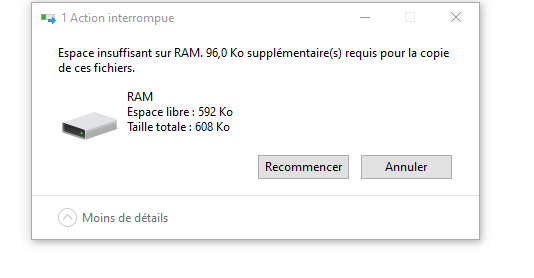
If you are trying to update your ZOYI ZT-703S oscilloscope multimeter and see an insufficient memory message, do not worry. In most cases, the issue is not caused by a faulty device. It usually happens because temporary data is still stored in the meter or because the firmware file is still set to Read-only before transfer.
The ZOYI ZT-703S is a 3-in-1 handheld tester that combines a 50 MHz dual-channel oscilloscope, a 25,000-count True RMS multimeter, and a signal generator. Keeping the firmware updated is important for stable performance, compatibility and feature improvements.
Why the ZOYI ZT-703S Is Popular
The ZOYI ZT-703S handheld oscilloscope multimeter is widely used by electronics repair technicians, engineers, hobbyists and field-service users because it combines multiple test functions in one portable unit.
Key specifications commonly highlighted for the ZT-703S include:
• 50 MHz oscilloscope bandwidth
• Up to 280 MSa/s sampling rate
• Dual-channel waveform display
• 25,000-count True RMS multimeter
• Built-in signal generator
This makes the device suitable for circuit diagnostics, waveform testing, power-supply checks, automotive electrical work, signal tracing and general electronic troubleshooting.
You can also compare this model with the newer version in our guide: ZOYI ZT-703S vs ZT-703S+ — What Is the Difference?
How to Fix the Insufficient Memory Error During Firmware Upgrade
Please follow the steps below carefully before copying the new firmware file to the meter.
1. Perform a Factory Reset
Before starting the update, carry out a factory reset on the ZOYI ZT-703S.
1. Enter the third menu.
2. Press F2 to restore settings.
3. When the screen displays the prompt, press the MENU key.
4. The system will reboot.
5. The factory settings will be restored.
This step is referenced from the user manual section for restoring settings. After the reset is complete, reconnect the device to your computer and enter USB mode again.
2. Remove the Read-Only Attribute From the Firmware File
This is a critical step and is often missed.
Download the latest firmware file from the official ZOYI/Zotek firmware page: ZOYI / Zotek ZT-703S firmware download.
Then follow these steps on your computer:
1. Locate the firmware file, for example ZOYI-703S-FW-V1.X.X.ZTK.
2. Right-click the firmware file.
3. Select Properties.
4. Untick Read-only.
5. Click Apply, then click OK.
3. Copy the Firmware File Correctly
Once the factory reset is completed and the firmware file is no longer read-only, copy the file to the meter again.
1. Reconnect the ZT-703S in USB mode.
2. To enter USB mode, press F1 + Power Button.
3. Drag and drop the firmware file into the device folder.
4. Safely eject the device from your computer.
5. Allow the meter to reboot and complete the installation.
4. Understand Firmware Size vs RAM Disk
Although the visible RAM disk may show about 592 KB usable space, the firmware installation process also uses internal memory during reboot.
After a factory reset and after removing the Read-only attribute, the current V1.6.12 firmware file can normally copy and install correctly.
Official ZOYI ZT-703S Specifications
Oscilloscope bandwidth: 50 MHz
Sampling rate: up to 280 MSa/s
Channels: Dual-channel oscilloscope
Multimeter resolution: 25,000 counts True RMS
Main functions: Oscilloscope, digital multimeter and signal generator
Display: Colour screen for waveform and measurement viewing
These specifications are part of the reason the ZT-703S is frequently searched for under terms such as oscilloscope multimeter, handheld oscilloscope, digital oscilloscope multimeter, 50MHz oscilloscope multimeter and True RMS oscilloscope tester.
For more models, browse the ZOYI multimeter range or see our ZOYI ZT-703S product page.
Best Uses for the ZOYI ZT-703S
• Electronic circuit troubleshooting
• Signal waveform analysis
• Bench and field diagnostics
• Automotive electrical testing
• Power supply and control board repair
• DIY and professional maintenance work
Because it combines waveform analysis with multimeter functionality in one portable device, the ZT-703S is particularly useful for users who want to reduce the need to carry separate instruments.
Useful External References
These general references may help beginners understand the main functions of the ZT-703S:
• Learn about oscilloscopes and waveform measurement.
• Learn about digital multimeters and electrical testing.
• Learn about signal generators and test signals.
Need More Help?
You can follow the official ZOYI ZT-703S firmware upgrade and user guide video here: watch the ZT-703S firmware guide video.
If the problem continues after following all the steps above, please contact ZOYI UK Support so the issue can be escalated to the technical team for further assistance.
Need a ZOYI Oscilloscope Multimeter?
Explore the ZOYI ZT-703S handheld oscilloscope multimeter with 50 MHz dual-channel waveform testing, True RMS multimeter functions and built-in signal generator.
View ZOYI ZT-703S